Tampilkan postingan dengan label seo. Tampilkan semua postingan

10 Tips How to Optimize Your Website/Blog 2014

Posted by Unknown Jumat, 01 November 2013 0 komentar
1. Include Meta and title tags. Some search engines still use Meta Keyword, Meta Description and Title tags to catalog and rank Web pages. Be sure to place a title tag at the top of each page to identify the document's overall content. You should also write an accurate Meta description tag because it's often used by search engines to describe a site in search results. And don't neglect to include a Meta keyword tag to reveal the most important keywords for each page to search engine spiders. This is one Website optimization trick you do not want to overlook because Meta tags can be the key to getting "found" by search engines.> Learn How To Write Title Tags For Your Web


2. Place keywords strategically throughout your content. Having keyword-rich content is the key (pardon the pun) to performing well with search engines. Load your Home and other critical pages with important keywords, since it may be the only page indexed by some engines. If you're not sure which keywords to weave throughout your Website, try using software like WordTracker. It's one of the leading tools you can use for website optimization, and it's available through a free trial.

You can learn here> How To Write A Keyword Rich Blog Post

  • Keyword research will help you to identify keywords that are high in demand and relatively low in supply. Demand is important because it makes up the number of people who use the keyword to obtain information that is related to the keyword over the internet. Supply matters because it actually represents the number of competitors for that keyword. The higher the demand, the more traffic you will receive from the keyword. The more the supply, the harder it will be to get a sufficient listing in the search engines.
  • Once you've determined the best keywords to use, place them strategically on each Web page. Focus on areas that register well with search engines, including bold headings, near the top of the page and at the end of the page. You should also embed keywords in the anchor text used to describe links, your domain name and title and Meta tags. Try to use keywords to create a theme throughout the content on your site. Search engines tend to look for a theme or common topic on a Website in an effort to deliver more relevant results for searchers.
  • Keep in mind that keyword proximity is also important. So place your keywords as closely together as possible, while making sure your sentences remain clear. Finally, and perhaps most importantly, ensure a proper keyword density or weight. This involves the proportion of keywords to the rest of the text. The greater the percentage of keywords, in relation to other text, the better.

3. Use your primary keywords in an H1 header tag near the top of your page. Google gives extra weight to text located within header tags when computing PR[citation needed]. Also use a couple of H2 tags on your page because they count as well.

4. It's always good to inspect your website after any updates, especially changing tags. It is very easy to create broken links and design flaws which may affect your search engine optimization, not to mention your traffic and revenues. You will also need to create a sitemap.xml file (generally provided for free) to submit to search engines to optimize your website.


5. Keep your content updated and provide enough content. Good Web content is a critical factor in keeping site visitors interested and coming back for more. It's also the key to higher search engine rankings. Major search engines typically require you to have at least 200 to 250 words on each Web page. So it's important to include plenty of valuable content to appeal to search engines-and visitors.

  • It's also crucial to keep your Website updated with fresh content. This lets search engines know the content on your site isn't stale, plus it will keep your site appealing to visitors looking for the latest information. Granted, it can be time-consuming to keep your content updated. However, the potential benefit from this Website optimization trick makes it well worth the effort.

6. Avoid using frames if possible. Frames, which are being used less and less, enable you to split a page into pieces and section off static content to decrease download times. However, today's Websites are larger and require more dynamic elements than are feasible with frames. Having a complex frame set up, can keep you from creating a search- engine friendly Website that draws a high ranking.

  • Frames allow you to split a page into pieces and section off static content to decrease download times. However, they can cause navigation difficulties and prevent search engines from being able to access every page on your Website. You could use a site map to address this problem, but it's simpler to not use frames for your Website.

7. Build incoming or back links. Building good incoming or back links can also increase your search engine ranking and Website traffic. Here's why this Website optimization trick is so crucial: Most major search engines rank Web pages based on the number and the quality of links that point to the Website (link popularity). They do so because it's very difficult for Web masters to "fake" good links. As a result, link analysis gives search engines a useful means of determining which pages are good for particular topics.

  • Place links to all of your pages on your home site as well as every other page on your site in order to make it very easy for the search engine spiders to crawl your site, if possible.

8. Create a Site Map page and link to it directly from your home page. On your Site Map page place links to every other page in your website. This guarantees that every page on your website can be reached with a maximum of two mouse clicks or "link follows" by the spiders.

  • Listing your Website with relevant directories and portals is an ideal way to build valuable incoming links. You can also write articles, forum/blog posts, and testimonials and include a link pointing back to your site. In addition, you can trade links with Websites that complement yours. Just make sure they're not competing Websites. The main objective is to link to sites that are closely related to your site's topic. If your Website is about software, for example, link only to sites relating to the topic of software.
  • As you build incoming links, keep in mind that search engines look for Websites that are useful for site visitors. If the linking structure of your Website indicates that it is helpful and informative, you'll generate more favorable search engine rankings. You'll also enjoy a steady stream of targeted traffic from your link partners.

9. Use 'alt' tags to describe your photos. If you can use a keyword or two in your alt tag that is even better, but be careful here that your alt tag accurately describes the photo or Google may consider it to be spam.

10. Validate Your HTML Code. While search engines don't care whether your HTML code is error-free, they rely on the basic correctness of the code to find out which portions of your web page to index. If your HTML code contains errors, it is possible that only portions of your web page are included in the search engine's database. The errors, while undetectable in a web browser, may lead the search engine software to think that some of the text on your page is part of the HTML formatting information rather than your site's content. As a result, the search engine may ignore that text, and your web page will not be shown in its results page. (i.e.) The <! DOCTYPE HTML PUBLIC "-//W3C//DTD HTML 4.01 Transitional//EN" "Http://www.w3.org/TR/html4/loose.dtd"> Is required

Add TechzDot on BBM: 25C037D0
For Trending Updates At Your Finger Tips
If you have any questions or suggestions feel free to drop your comment in the comment box below.

Baca Selengkapnya ....

10 Questions to Ask When Creating a Social-Media Marketing Plan

Posted by Unknown Kamis, 31 Oktober 2013 0 komentar


  1. What should my company aim to achieve with social media?
  2. Who should set up and maintain my company's social media accounts?
  3. Should my company have a presence on all of the popular social-media networks?
  4. What are the best social networks for small businesses?
  5. How often should I post new content on my social networks?
  6. What types of content should I post on which social platforms?
  7. Should I use social media to provide customer service?
  8. How can I convert social-media followers into customers?
  9. How can I measure the success of my social-media marketing efforts?
  10. What is the biggest mistake to avoid?


Add TechzDot on BBM: 25C037D0
For Trending Updates At Your Finger Tips
If you have any questions or suggestions feel free to drop your comment in the comment box below.

Baca Selengkapnya ....

5 Unbeatable Ways To Do Better Blog Commenting

Posted by Unknown Selasa, 29 Oktober 2013 0 komentar

In this post, I am going to share some killing steps to do better blog commenting and getting your comments approved for sure. Blog commenting, if done properly, can get you a high number of back-links to your blog. It also increases your visibility among your niche blogs. Most of the bloggers are aware of these facts and working hard but improper blog commenting leads them nowhere.

After learning about the right ways to do blog commenting and after applying the fundamentals on myself, I have now decided to write about it to share with other bloggers. So, here we go with 5 unbeatable ways to do better blog commenting.

1) Make a proper plan for it.

Anything or everything in which you want to do something good, should be planned properly first. You can not go to any blog randomly and leave a comment to get beneficial back-links.


I suggest you to make a list of 20 blogs of your niche with a good page rank ( 3 or above ). You can do a search for this list. Now start going through each of these blogs, start reading posts that you find interesting and beneficial for you and start making comments. If your blog is new and needs more back-links like mine, you need to spend more time than you think on blog commenting. I would recommend you to keep at least 90 minutes for blog commenting in a day.

Besides back-links, you also need to improve your popularity among your niche blogs and for that too, you need to do blog commenting on a regular basis. After learning the proper strategies to do blog commenting, I have not left a day without blog commenting.

2) Throw away your hesitation.

In the starting stage of blog commenting, you will surely feel a little hesitation on leaving comments on others’ blogs. You might be spending 15 minutes  thinking a lot for a single comment- whether I should write it or not? Will my comment be approved or not? Does my comment looks foolish? If you feel like this, don’t worry,it is normal but you need to vanish it soon. Follow the rule of ‘think less and do more’. Author of the post on which you are commenting has also passed through your stage. He will definitely encourage and appreciate your action.

So just keep you hesitation out of the room and start commenting now.

3) Cut down regular spammy words.

If you write in the comment box ”thank you for sharing this post, nice post, thank you for the information, great post, great work” or any other such words, your comment is never going to be approved. Remember, you are commenting on a blog that has a good page rank. How can expect an experienced author to approve your comment that looks spammy?

For better blog commenting, you need to read the post thoroughly and understand it first. Then leave such a comment that shows, you have gone through the post and you are not posting this comment just for back-links. Posting an original and natural looking comment not only grabs attention from the author and other readers but also improves your knowledge about that particular topic.


4) Get your photo on Gravatar.

If you have not put your face on Gravatar, do it right now. Most of the bloggers take this factor very lightly. I personally mark such comments without any face as spam. If you are living in a society all time with a covered face, who will engage with you? No one. Blogging is also a society. You need to show your identity. This is a basic but most important factor to be considered for better blog commenting.

5) Suggest or inquire something valuable.

Reading the post completely and understanding it and then leaving a normal comment such as ”I liked this advice” or so has become an old fashion now. To grab more attention,You can suggest or add something valuable in your comment that is related to the post. You can take this example, this post covers five important points about ”how to do better blog commenting” and you have one more point in your mind other than these five, just write it in the comment box.

Second, if you have some doubt about any point in this post, feel free to ask that as well. Any blogger will be more than happy to listen to your suggestion or query.

Final words

Being myself a newbie in blogging, I would recommend you to follow these five points and lead yourself to a better blog commenting. And do not leave this post before posting your valuable comment in the box.
All content was culled from Just4r.com

Add TechzDot on BBM: 25C037D0
For Trending Updates At Your Finger Tips
If you have any questions or suggestions feel free to drop your comment in the comment box below.

Baca Selengkapnya ....

How To Write A Keyword Rich Blog Post

Posted by Unknown 0 komentar
Keyword Research plays an important role for a good optimization of your article/post. If you are writing a good quality post without finding the best keyword then it could find difficulty in getting into the top results of Google. So, it is highly advisable to make an effort in doing keyword research for finding the keyword with maximum search volume, high CPC( cost per click) and low competition.

There are some other tools which are available for keyword research but i find the ones in this article very helpful even to my daily blogging

You can learn here> 10 Tips How to Optimize Your Website/Blog 


Long Tail Pro 

Long Tail Pro is a keyword research tool (its main function, besides we can use it to do some other tasks such as checking the website rank in search engines, checking the domain available etc., but I like the keyword research section most)

The man behind this tool is Spencer Haws, who is famous all over the world as a pioneer and inspirer in niche site building. It is a paid application and for this also you have to loosen up your pocket but no worries Long Tail pro offers 10 days trial absolutely  free in order to satisfy its customers regarding the utility of the application.so first use its trial version and if you find it productive you can buy as it is going to beneficial for you in a long run.to try its trail version follow the link- www.longtailpro.com

Ubersuggest:> How it works:

Get keyword ideas with Übersuggest the free keyword suggestion tool that makes good use of Google Suggest and other suggest services.
  • Write a term in the box.
  • Choose a language and a source. Übersuggest can get suggestions either from regular Web search or from search verticals like Shopping, News or Video (more to come).
  • Übersuggest takes your base term, add a letter or a digit in front of it, and extracts suggestions for it.
  • Click on each word to get further suggestions based on that term.
  • Add each keyword to your basket clicking on the plus sign on its left.
  • Add all visible keywords to your basket clicking on the large grey button.
With this free keyword tool you can instantly get thousands of keyword ideas from real user queries! Use the keywords to get inspiration for your next blog post, or to optimize your PPC campaigns.

Google auto suggest

This is a tool by keywordtooldominator which actually takes default feature of Google auto suggestion to next level.you can easily find all auto suggested keyword and can select accordingly that suits you and you think will be good in order pull targeted readers to your blog.

here is the screenshot  of Google auto suggest showing results for the queried keyword:

How to drive traffic to your blog from YouTube? Click HERE 

Add TechzDot on BBM: 25C037D0
For Trending Updates At Your Finger Tips
If you have any questions or suggestions feel free to drop your comment in the comment box below.

Baca Selengkapnya ....

How To Get Technorati Approval

Posted by Unknown Minggu, 27 Oktober 2013 0 komentar
I purposely write this post for the new beginner bloggers out there who are finding it hard to get approval from Technorati. To be brief, Technorati is an important blog directory which consists of a huge collection of blogs. These blogs are divided in different categories so it provides an easy navigation for a new visitor.

And it is being said that if you want to be a successful blogger then you have to make your online presence on every possible sites.

Now lets go straight to the steps as given below:

There are three basic steps that we need to cover in order to get our Blog’s presence in Technorati.

Register > Submit your blog > Claim your Token

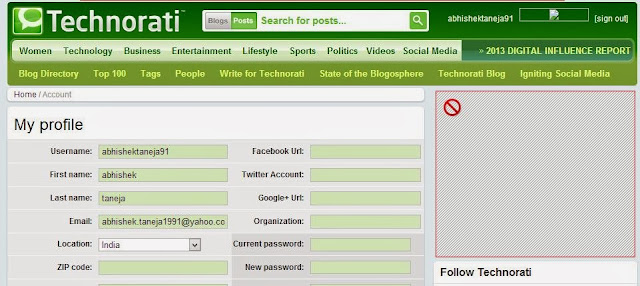
The very first step is to get registered on technorati.com, Once you are done with your free registration on technorati.com , the next step is to Submit your blog with all your details as:


The next important step is to claim your site. With this, you will be getting a confirmation email from technorati with a token code. Now, you need to put this token code in the content body of your new post and publish it.

NOTE: One basic mistakes that most Bloggers commit is that they update this token code with their previous post. But now, there are two ways of putting your token Id in your post.
  • Make a new post and name it as ” Test for Technorati” or 
  • Add your Token Id with a recent post that you are going to publish .
When you are done with these steps then Technorati will crawl your blog and it could take some days to get your claim approved .

Once your claim is done, you can remove your Technorati token Id from your post. You can find the status of your claim process in your account of Technorati. It usually take few days to get your blog/website to get approved but it is worth to get it registered on Technorati.

If you are finding any difficulty in submitting your blog to Technorati then you can ask your doubts via comments below. And if you have some more important Websites or Directories where a blogger can submit his blog then please share it in the comment box below. Thanks!

Baca Selengkapnya ....

How to Write Title Tags for Your Web Pages

Posted by Unknown Sabtu, 19 Oktober 2013 0 komentar
By: Donald Nelson

I have actually been searching for this very topic to help my readers out, after i stumbled upon the article i decided to publish it on this blog as it had really helped me in time past and still indeed helping me real big time. When it comes to search engine optimization, the single most important sentence that you will write for your website is the title tag of your main page. If you write it properly then you will have taken a big step towards getting your site well placed in search engine queries for your important keywords.

Before I give you a step-by-step guide to writing title tags, let's define what they actually are and see why they are important. When you look at a web page in your browser, the writing in the blue strip above browser's commands (file, edit, view, etc.) is the title tag. On your actual html document the title tag is in the head portion between the notation <title> and </title>.


  The title tag is important because it "tells" the search engine what the page is about, and in the case of your main page, what your website is all about. I remember back in my school days that we used to take standardized examinations in which we had to read a story and then answer the question: "What would be the best title for this essay?" Choosing a title tag is something like answering this kind of question. You've got to pick out the gist of your enterprise and highlight it in a sentence. So, take a look at your web page and get ready to begin, following these steps:

1. Make sure your three or four most important keywords or keyword phrases appear in the title tag. The most important words should appear near the beginning of the sentence, and they can be repeated within the sentence for added emphasis. For example, if I am offering low-cost web design, then my title tag might look like this: <title>Web Design: Affordable, Low Cost Web Design from the Acme Web Design Company</title>

2. Leave your branding and sales pitch for another part of the web page. Although it is a natural tendency to want to put your company name at the beginning of the title tag, you should remember that unless you are very famous like Coca Cola, people are not searching for you. So, put your most important keywords at the front of the title tag, and establish your brand name with your logo and other elements of the web page. If your company name includes your keywords, like our hypothetical Acme Web Design Company, then put it in the title tag, but not necessarily at the beginning.
Similarly, the title tag is no place for your sales pitch, so keep out flowery or extraneous adjectives, unless they are actual terms used in searches for your product or service.

3. Place your geographical or niche-defining term in your title tag. If you are trying for a top ten or top twenty position for a term such as "web design," then you are really in for a difficult struggle. However, suppose the Acme Web Design Company is located in Columbus, Ohio. Then instead of attempting the almost impossible task of getting the top rankings for the term "web design," it would be far better to get a high ranking in the geographical niche using a title tag such "Web Design, Columbus, Ohio: Low Cost Web Design in Columbus, Ohio by The Acme Web Design Company"


4. The title tag can be longer than you think. Some guidelines say that the title tag should be no longer than 70 characters. It is true that only the first 70 characters will show in the top bar of the browser, but search engine robots will read the rest of the tag and the search engines will not penalize you for going over the 70 character mark. Take a look at highly ranked sites in heavily competitive categories and you will see examples of long title tags. Write the tag according to your need to get your important words and phrases included in a sentence that best describes what your product or service is about.

5. Vary the title tags on the inner pages of your website. Even with a long title tag, it is not possible to highlight all the possible terms which someone might use to find your website. This is not a problem if you make use of the other pages of your website. Instead of simply having a title tag that says "services" our web design firm could highlight "low cost, web design services" on that page. The "contact" page could be used to emphasize the geographical location once again, and so on. Many websites make the mistake of repeating the same title tag on each of the inner pages of the site. Avoid this and use each of your page's titles to target important keywords and keyword phrases.

So, take a look at your website's title tags, and see if you can improve them. The effort that you make will be well rewarded.

Baca Selengkapnya ....
Trik SEO Terbaru support Online Shop Baju Wanita - Original design by Bamz | Copyright of samsung galaxy apps.